
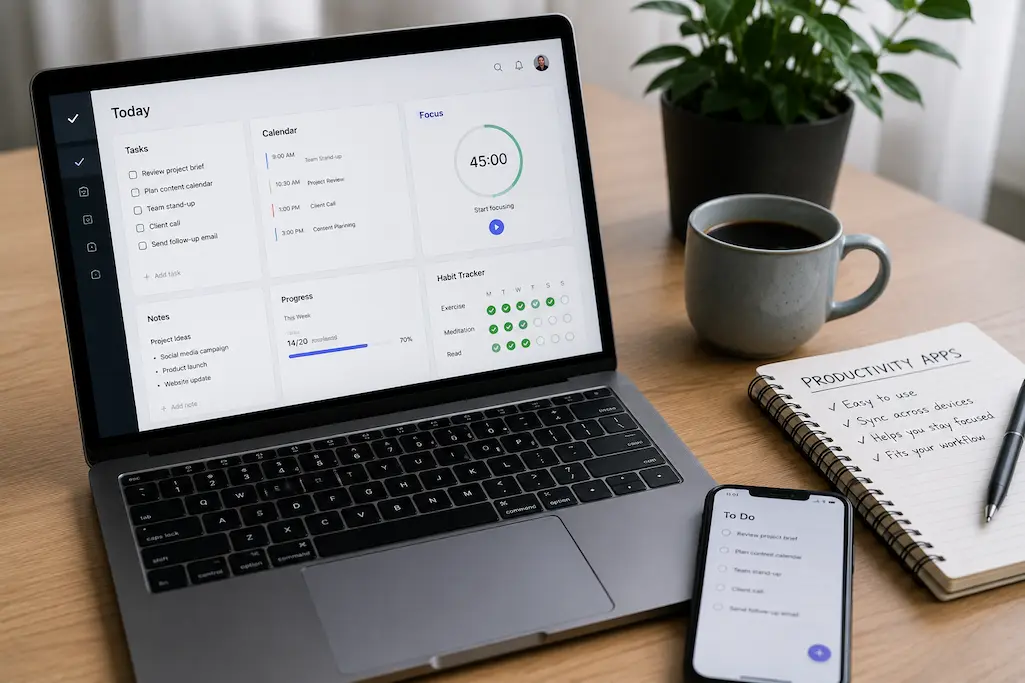
Choosing a productivity app sounds easy until you realize how many are available. Open any app store and you’ll find thousands of options promising better focus, smarter planning, faster note-taking, and perfectly organized days. Yet after downloading them, many people stop using them within a week.
The problem usually isn’t motivation. It isn’t even the app itself.
More often, the issue is choosing software that looks impressive instead of something that naturally fits everyday habits. The best productivity app isn’t the one with the longest feature list—it’s the one that quietly becomes part of your daily routine.
Whether you’re managing work projects, studying, running a business, or simply trying to stay organized at home, selecting the right productivity tool can make your day smoother instead of adding another digital distraction.
This guide explains how to make smarter choices so that the apps you install today are still helping you months from now.
Why Most Productivity Apps Get Abandoned
People rarely stop using productivity apps because they’re lazy. Most abandon them because the apps create more work than they remove.
Many applications promise an all-in-one solution. They include task boards, calendars, reminders, AI assistants, time tracking, document storage, collaboration tools, dashboards, analytics, and dozens of settings. While impressive during the first few days, these features often become overwhelming.
Instead of helping users stay organized, the software demands constant attention.
A simple grocery list suddenly requires selecting labels, assigning priorities, choosing colors, setting reminders, creating categories, and organizing folders. Eventually, writing things on paper feels faster.
When an app takes longer to manage than the work itself, people naturally stop opening it.
The Excitement of Trying Something New
There’s something satisfying about discovering a beautifully designed app. Reading reviews, watching demonstrations, and imagining a perfectly organized future creates excitement.
Unfortunately, that excitement doesn’t last.
The novelty fades once everyday responsibilities return. If using the app requires too much effort, people slowly drift back to familiar habits like sticky notes, notebooks, or simple phone reminders.
That’s why consistency matters far more than initial enthusiasm.
Why Complexity Ruins Consistency
Some people assume professional users need advanced software packed with every possible feature.
In reality, experienced professionals often prefer tools that disappear into the background.
Think about a good notebook. It doesn’t interrupt you with notifications or ask you to configure settings before writing a thought. Great productivity software works similarly—it helps you focus on your work instead of the tool itself.
Start by Understanding Your Real Problem
Before downloading anything, ask yourself one question:
“What exactly am I struggling with?”
That answer matters far more than the app’s popularity.
Someone who constantly forgets appointments needs a reliable calendar, not a complex project management platform. A student drowning in research notes doesn’t necessarily need advanced task management software. Likewise, a freelancer juggling multiple clients may benefit more from a project tracker than a habit-building app.
Choosing software without identifying your problem often leads to disappointment.
Finding Everyday Productivity Bottlenecks
Pay attention to small frustrations during your day.
For example:
- You miss deadlines because you forget tasks.
- Your notes are scattered across notebooks and documents.
- Meetings overlap because your schedule isn’t centralized.
- You lose files because they’re stored in different places.
- You constantly rewrite the same to-do lists.
These recurring issues reveal what kind of tool will genuinely improve your workflow.
Rather than asking, “What’s the best productivity app?” ask, “What slows me down every day?”
The answers are surprisingly practical.
Matching Apps to Specific Needs
Different productivity challenges require different solutions.
| Challenge | Better Solution |
|---|---|
| Forgetting tasks | Task management app |
| Missing appointments | Calendar application |
| Disorganized ideas | Note-taking software |
| Poor concentration | Focus timer |
| Building routines | Habit tracker |
| Team collaboration | Shared workspace |
This simple matching process prevents downloading apps that solve problems you don’t actually have.
Different Types of Productivity Apps
Not every productivity tool serves the same purpose. Understanding the major categories makes choosing much easier.
Many people try forcing one application to handle everything. That usually creates unnecessary complexity.
Instead, use each tool for what it does best.
Task Management Apps
Task managers help organize responsibilities, deadlines, and projects.
They’re especially useful when work involves multiple steps rather than one-time reminders.
Good task management software makes it easy to
- Break large projects into smaller actions.
- Set realistic deadlines.
- Track progress.
- Prioritize important work.
- Reduce mental overload.
The goal isn’t creating beautiful task lists. It’s making sure important work doesn’t slip through the cracks.
Note-Taking and Knowledge Management
Ideas appear unexpectedly.
A useful note-taking app makes capturing those ideas almost effortless.
Students, writers, researchers, consultants, and business owners often rely on searchable digital notes because information becomes easier to find months later.
Instead of searching through dozens of documents, everything remains organized in one searchable location.
The best note-taking systems encourage quick thinking rather than perfect formatting.
Calendar and Scheduling Tools
Time is different from tasks.
A task says what needs doing.
A calendar shows when you’ll actually do it.
Confusing these two concepts is one reason many people feel busy without making meaningful progress.
Reliable calendar applications help you visualize your available time instead of simply collecting endless tasks.
Blocking focused work sessions, appointments, deadlines, and personal commitments creates a more realistic daily schedule.
Habit Trackers and Focus Apps
Productivity isn’t always about working harder.
Sometimes it’s about reducing distractions.
Focus timers, habit trackers, and screen-time management tools encourage consistency instead of intensity.
Reading for twenty minutes every day often produces better long-term results than reading for four hours once a month.
The same principle applies to exercise, learning, writing, and professional development.
Small actions repeated consistently almost always outperform occasional bursts of motivation.
Features That Actually Matter
Marketing pages often highlight dozens of capabilities designed to attract attention.
But once you begin using an app daily, only a handful of features truly affect the experience.
The first is simplicity.
If creating a task takes five steps, you’ll eventually stop creating tasks altogether. Clean interfaces reduce friction, making it easier to capture ideas before they’re forgotten.
Reliability is just as important. An app that crashes, syncs slowly, or loses information quickly becomes a source of stress rather than support. Fast loading times and dependable synchronization across your phone, tablet, and computer save far more time than flashy animations ever will.
Finally, look for flexibility without unnecessary complexity. The best productivity tools adapt to your workflow instead of forcing you to completely change how you think and work.
An app should support your habits—not expect you to build your life around its interface.
Avoid the Feature Trap
It’s surprisingly easy to mistake more features for better value. After all, if one app offers ten capabilities and another offers fifty, the second one must be the smarter choice—right?
Not necessarily.
Many productivity apps have evolved into platforms that try to handle every aspect of work. They include chat, document storage, automation, calendars, databases, dashboards, AI assistants, forms, and reporting tools. While these additions can be useful for large organizations, they often create unnecessary complexity for individuals.
The result is a tool that demands your attention instead of supporting your workflow.
When evaluating an app, focus less on what it could do and more on what you’ll actually use every day.
More Tools Don’t Always Mean Better Results
Imagine buying a kitchen appliance with fifty different cooking modes but only ever using two of them. The extra options don’t improve your meals—they simply make the control panel more confusing.
Productivity software works the same way.
If your daily routine involves creating tasks, checking deadlines, and taking notes, an app that performs those functions exceptionally well is usually a better investment than one packed with features you’ll never touch.
Simple tools are easier to learn, quicker to open, and less likely to become frustrating over time.
The Hidden Cost of Endless Customization
Customization sounds appealing until every project requires new labels, folders, tags, colors, priorities, templates, and workflows.
Some users spend hours organizing their productivity system instead of completing the work it was supposed to support.
A little personalization is helpful, but don’t confuse organizing your app with being productive.
A useful question to ask is the following:
“Am I working, or am I organizing the place where work happens?”
If the second answer becomes more common, it’s probably time to simplify.
Build a System Instead of Collecting Apps
Many people believe they’re becoming more organized because they’re constantly trying new apps.
In reality, they’re just moving the same information from one platform to another.
A better approach is to create a small, dependable system where each tool has a clear purpose.
For example:
| Purpose | Recommended Tool Type |
|---|---|
| Appointments | Calendar |
| Daily tasks | Task manager |
| Ideas and research | Note-taking app |
| File storage | Cloud storage |
| Long-term habits | Habit tracker |
Notice that there’s very little overlap.
Each application has one primary responsibility, making your digital workspace easier to maintain.
Reduce Digital Clutter
Digital clutter can be just as distracting as a messy desk.
Duplicate notes, forgotten reminders, unused folders, abandoned apps, and scattered documents all create friction when you’re trying to find information quickly.
Every few months, review the tools you use.
Ask yourself:
- Which apps do I open every day?
- Which ones haven’t been used in weeks?
- Are two apps doing the same job?
- Can I simplify my workflow?
Removing unnecessary software often improves productivity more than installing something new.
Choose Apps That Work Well Together
Instead of searching endlessly for one perfect app, think about how different tools fit together.
For instance, your calendar might hold appointments, and your task manager tracks actionable work, while your note-taking app stores ideas and meeting notes.
Each has a distinct role, making your workflow easier to understand.
The goal isn’t building the most advanced productivity system.
It’s building one you’ll actually keep using.
How to Test an App Before Committing
Choosing a productivity app shouldn’t feel like making a lifetime decision.
Instead of migrating all your information immediately, run a short personal trial.
Seven to fourteen days is usually enough to discover whether an app fits naturally into your routine.
During this period, use it for real work rather than sample projects.
If you’re managing client deadlines, plan actual deadlines. If you’re studying, organize your current coursework.
Real-life use reveals strengths and weaknesses far more quickly than tutorials ever will.
Questions Worth Asking
After using an app consistently, ask yourself:
- Did I remember to open it without forcing myself?
- Did it save time or create extra work?
- Was finding information quick?
- Did I enjoy using it?
- Would I miss it if I deleted it tomorrow?
If several answers are “no,” there’s little reason to keep investing time in that tool.
Common Mistakes People Make
Finding the right productivity app isn’t only about choosing wisely. It’s also about avoiding habits that quietly undermine your system.
Switching Apps Too Frequently
A new productivity app launches almost every week.
It’s tempting to believe the latest release will finally solve every organizational problem.
Unfortunately, constant switching prevents you from building routines.
Each move requires exporting data, learning new menus, changing workflows, and rebuilding habits.
Eventually, more time is spent migrating than accomplishing meaningful work.
Unless your current app has serious limitations, consider improving your workflow before replacing your software.
Copying Someone Else’s Setup
Social media is filled with beautifully organized dashboards, colorful calendars, and elaborate productivity systems.
They’re inspiring—but they aren’t universal.
A university student, freelance designer, software developer, teacher, and small business owner all manage different responsibilities.
Your system should reflect your own priorities rather than someone else’s aesthetic.
The best workflow is the one that feels almost invisible because it fits naturally into your day.
Create Long-Term Habits with Productivity Apps
The real value of any productivity app appears after the excitement wears off.
That’s when habits matter.
Rather than trying to organize every part of your life on day one, start small.
Use one feature consistently before adding another.
If you’re using a task manager, simply record tomorrow’s priorities each evening.
If you’re using a note-taking app, capture ideas whenever they appear.
These tiny routines eventually become automatic.
Keep Daily Maintenance Minimal
Your productivity system should require very little maintenance.
Avoid spending thirty minutes organizing tasks before beginning actual work.
Instead:
- Review today’s priorities.
- Update completed tasks.
- Add anything new.
- Close the app and start working.
A five-minute review is usually enough.
Review Your Workflow Regularly
Your responsibilities will change over time.
An app that worked perfectly during university might not suit a growing business.
Likewise, a project management tool designed for a large team may become unnecessary when working independently.
Every few months, evaluate your workflow.
Keep what helps.
Remove what doesn’t.
Small adjustments are far easier than rebuilding your entire system from scratch.
Signs You’ve Found the Right Productivity App
How do you know you’ve made a good choice?
The answer is surprisingly simple.
A great productivity app fades into the background.
You don’t constantly think about using it—it becomes part of your routine.
Some clear signs include:
- You open it naturally throughout the day.
- You trust it to store important information.
- It reduces stress instead of creating it.
- You spend more time doing work than organizing it.
- Missing a day feels unusual because the habit has become automatic.
When software reaches that point, it’s no longer just another app on your phone or computer. It’s become a practical tool that genuinely supports your daily life.
Conclusion
Choosing the right productivity app isn’t about finding the most powerful software or following the latest trend. It’s about selecting tools that solve real problems without adding unnecessary complexity.
Start by identifying what’s slowing you down. Choose applications with a clear purpose, keep your digital workspace simple, and resist the temptation to switch platforms every time a new option appears. Remember that consistency beats perfection. A straightforward app you use every day will almost always deliver better results than an advanced platform you abandon after a month.
Productivity isn’t created by downloading more apps. It’s built through simple systems, realistic habits, and tools that fit naturally into the way you already work.
Frequently Asked Questions
1. How many productivity apps should I use?
There’s no fixed number, but most people work effectively with three to five core apps that each serve a distinct purpose, such as tasks, notes, calendars, file storage, and habits.
2. Should I choose free or paid productivity apps?
Start with the free version whenever possible. Upgrade only if the paid features solve a genuine problem or save you meaningful time.
3. How long should I test a productivity app before deciding?
Using an app consistently for one to two weeks during your normal routine is usually enough to determine whether it suits your workflow.
4. Is it better to use one all-in-one app or several specialized apps?
It depends on your needs, but many people find that using a few focused apps is simpler and easier to maintain than relying on a single platform with dozens of features.
5. Why do I keep abandoning productivity apps?
This often happens because the app is too complicated, doesn’t solve your real problem, or requires more effort to maintain than the value it provides. Choosing simpler tools and building small daily habits usually leads to much better long-term success.

Daniel Kareem is a digital productivity and technology writer focused on simplifying everyday tech use. He creates practical guides on online safety, device optimization, and efficient workflows. His approach centers on clear, step-by-step advice that helps users stay organized, secure, and productive. Through straightforward and realistic content, he aims to make technology easier to understand and more useful in daily life.