
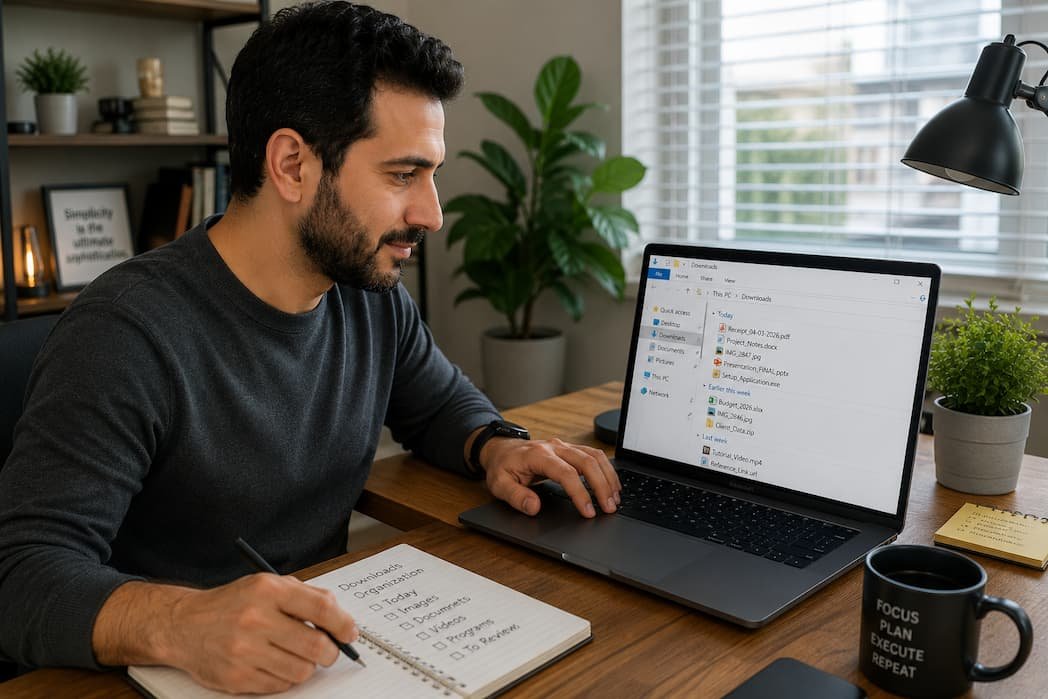
My Downloads folder is a graveyard. PDFs I opened once and forgot. Installer files for software I uninstalled six months ago. Three copies of the same photo because I couldn’t remember where I saved the first one. Screenshots with names like “Screenshot_2024-03-17_at_2.47_PM” that mean absolutely nothing to me now.
Sound familiar? The Downloads folder is where files go to die. It’s the default dumping ground for every browser, and because it’s so easy to dump things there, it fills up fast. The real problem isn’t the clutter — it’s the time you waste hunting for something you know you downloaded but can’t find in the mess.
I spent an afternoon fixing mine. Not perfectly — I’m not that person — but well enough that I can actually find things now. Here’s what worked.
Stop Letting Your Browser Decide Where Files Go
By default, everything lands in Downloads. Every image, every PDF, every installer, every ZIP file. No organization, no logic, just a chronological pile.
Most browsers let you change this. In Chrome, go to Settings > Downloads > “Ask where to save each file before downloading.” Firefox has the same option under Settings > Files and Applications. Turn it on. Yes, it’s an extra click every time. That click forces you to think about where the file actually belongs.
What I do now: I created a “Downloads” subfolder for each major project I’m working on. When I download something related to that project, I save it straight there. The main Downloads folder only catches things I’m genuinely unsure about — and those get sorted within a day or two.
Another option: set up browser rules. Some extensions can auto-sort downloads by file type. Images go to Pictures, PDFs to Documents, executables to a dedicated Installers folder. It’s not perfect — a PDF might be a receipt, a manual, or a contract — but it beats everything landing in one heap.
The Folder Structure That Actually Sticks
I’ve tried elaborate systems. Year > Month > Category > Subcategory. Tagging systems. Color-coded folders. They all collapsed within a month because they required too much maintenance.
The structure that survived is embarrassingly simple:
- Work — Everything job-related, sorted by project or client
- Personal — Bills, medical stuff, tax documents, personal projects
- Media — Photos, videos, music downloads
- Software — Installers, drivers, updates
- Temp — Things I need today and can delete tomorrow
That’s it. Five top-level folders. Anything that doesn’t fit gets a “Misc” subfolder inside the closest match. The Temp folder is the secret weapon — it’s where screenshots, one-off downloads, and “I’ll look at this later” files go. I clean it out every Friday. Takes five minutes.
Hard-learned lesson: I used to keep installer files “just in case.” Just in case what? The internet exists. If I need to reinstall something, I download the latest version. Keeping old installers is digital hoarding. I delete them now. Freed up almost 8GB.
Naming Files So Future You Can Find Them
“document_final_FINAL_v2.pdf” is not a filename. Neither is “IMG_4827.jpg.” These are cryptic puzzles you leave for your future self, and future you is busy and annoyed.
A good filename tells you what the file is, when it matters, and why you kept it. My format:
[Date]_[Project/Category]_[Description]_[Version if needed]
Examples:
2026-06-15_Invoice_Amazon_Purchase.pdf2026-05_Tax_Documents_W2_Summary.pdf2026-04_Project_Logo_Draft_v3.png
Yes, it’s longer. Yes, it takes a few extra seconds. But when you’re searching for “Amazon invoice May” six months later, you’ll find it in seconds instead of opening twelve mystery PDFs.
Pro tip: Use YYYY-MM-DD format for dates. It sorts chronologically in every file system. “06-15-2026” sorts before “01-01-2027” in some systems and after in others. “2026-06-15” always sorts correctly. Always.
Spaces in filenames are fine on modern systems, but underscores or hyphens are safer if you ever use command-line tools or scripts. Pick one and stick with it. Consistency beats perfection.
Automating the Boring Parts
Manual sorting is sustainable for a week. Maybe two. Then life happens and your Downloads folder becomes a swamp again.
Automation is what makes a system last. Here are three things I automated and never looked back:
1. Scheduled Cleanup
Windows has Storage Sense; macOS has Optimize Storage. Both can automatically delete files in Downloads after a set period. I have mine set to 30 days. Anything I haven’t moved out of Downloads in a month probably wasn’t important. If it was, that’s on me for not filing it properly.
2. Duplicate File Finders
Duplicate files multiply like rabbits. Same photo downloaded twice. Same PDF saved in two places. Tools like dupeGuru (free, cross-platform) or Gemini 2 (macOS, paid) scan for duplicates and let you review before deleting. I run one every few months and usually recover a gigabyte or two.
3. Cloud Sync with Selective Folders
I sync my Work and Personal folders to Google Drive automatically. Everything else stays local. This means my important stuff is backed up without me thinking about it, and my cloud storage isn’t clogged with random screenshots and temp files.
What I learned the hard way: I once synced my entire Downloads folder to Dropbox. It uploaded 40GB of junk, hit my storage limit, and started failing to sync actual important files. Be selective. Cloud storage is for things you need everywhere, not for digital hoarding.
Dealing with the Existing Mess
Okay, but what about the 3,000 files already sitting in Downloads? You don’t have to sort them all. That way lies madness.
Here’s my ruthless approach:
- Sort by date modified. Anything older than six months that you haven’t opened? Delete it. Be honest. If you needed it, you’d have found it by now.
- Sort by file size. The biggest files are usually videos, installers, or ZIP archives. These hog space and are often the easiest to delete.
- Batch rename the survivors. Pick a naming convention and apply it to anything you’re keeping. Tools like Bulk Rename Utility (Windows) or NameChanger (macOS) make this fast.
- Move them to proper folders. Don’t overthink it. Close enough is fine. Perfect is the enemy of organized.
The whole process took me about two hours for a truly catastrophic Downloads folder. Yours might be faster. Either way, it’s a one-time pain for long-term sanity.
When to Let Go of Files Entirely
Not everything needs to be kept. This was the hardest habit to build.
Receipts from two years ago for items you no longer own? Delete. Old resumes for jobs you didn’t get? Delete. Screenshots of conversations that resolved themselves? Delete. User manuals for products you could Google in ten seconds? Delete.
The cloud means you can find most information again if you truly need it. Keeping local copies of everything “just in case” is a habit from the dial-up era. Let it go.
My current rule: If I can’t articulate why I’d need this file in the next 12 months, I delete it. Exceptions: tax documents, legal papers, anything with sentimental value. Everything else is temporary until proven otherwise.
Downloads are meant to be temporary. That’s the whole point. Treat them that way and the clutter never builds up in the first place.
Related Articles
- What to Do Before Resetting an Old Laptop
- How to Audit Your Digital Footprint in Under 30 Minutes
- How to Review Old Online Accounts You No Longer Use
- A Simple Cyber Safety Routine for Everyday Protection
- Securing Shared Devices in a Busy Household
Sources and References
- Microsoft Support — “Free up drive space in Windows” (support.microsoft.com)
- Apple Support — “How to free up storage space on your Mac” (support.apple.com)
- Google Drive Help — “Choose what to sync to your computer” (support.google.com)
- dupeGuru — Open source duplicate file finder documentation (dupeguru.voltaicideas.net)
- David Allen — “Getting Things Done: The Art of Stress-Free Productivity” (Penguin Books, 2015)
I wrote this after spending a Sunday afternoon drowning in my own Downloads folder and realizing I’d downloaded the same file three times because I couldn’t find the first two copies. The systems here are the ones I actually use — not aspirational, not perfect, but functional enough that I rarely lose things anymore.

Daniel Kareem is a digital productivity and technology writer focused on simplifying everyday tech use. He creates practical guides on online safety, device optimization, and efficient workflows. His approach centers on clear, step-by-step advice that helps users stay organized, secure, and productive. Through straightforward and realistic content, he aims to make technology easier to understand and more useful in daily life.