
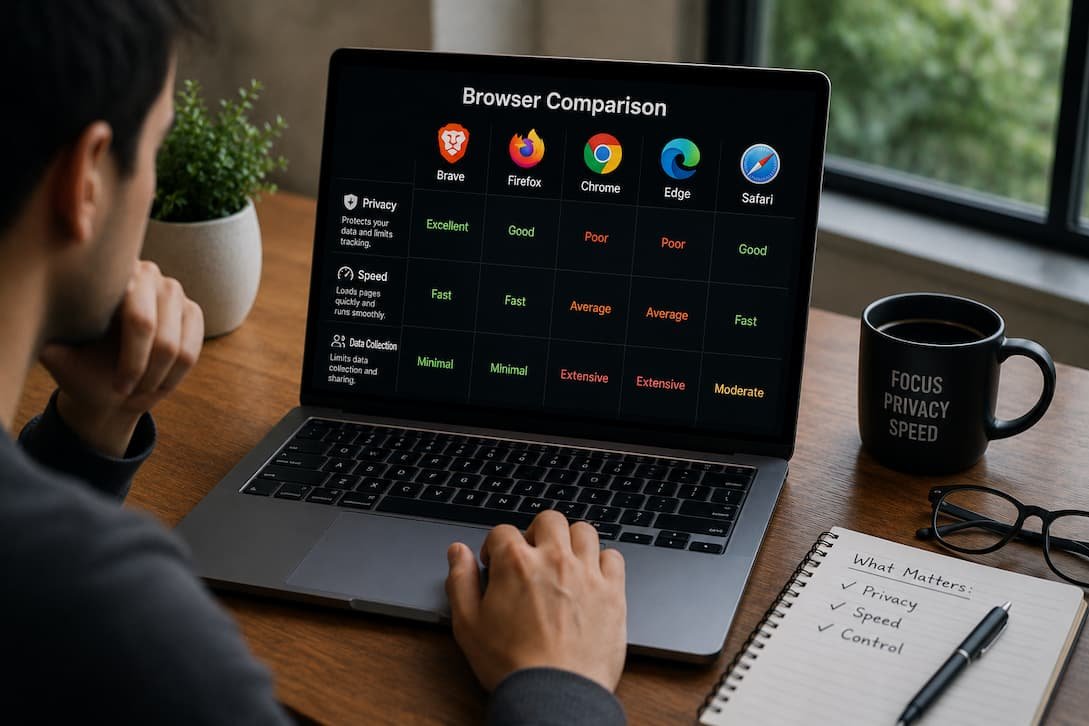
Choosing a web browser used to be simple. Years ago, most people installed whichever browser came with their computer—or downloaded the one everyone else seemed to use.
That’s no longer the case.
Modern browsers have matured in different directions. One focuses on compatibility, another on productivity, another on privacy, while another tries to balance speed with built-in protection against ads and trackers.
The interesting part is that none of them is objectively “the best.”
The best browser depends entirely on what you expect it to do.
If your work revolves around Google services, you’ll probably value different features than someone who cares most about privacy. Likewise, a gamer, a developer, and a casual web user are unlikely to choose the same browser for the same reasons.
Rather than declaring a single winner, let’s compare Chrome, Edge, Firefox, and Brave where those differences actually matter.
The Browser You Choose Matters More Than Most People Think
A browser isn’t just another application.
For many people, it’s the software they spend the most time using every day.
Think about everything that happens inside it.
- Emails.
- Banking.
- Shopping.
- Streaming.
- Work meetings.
- Research.
- Online learning.
- Cloud storage.
- Artificial intelligence tools.
- Project management.
If your browser is slow, everything feels slower. If it consumes too much memory, your computer feels less responsive. If it lacks good privacy controls, your browsing habits become easier to track.
Choosing a browser is less about loyalty to a brand and more about finding one that matches how you actually use the web.
At a Glance: Chrome, Edge, Firefox and Brave
| Browser | Best For | Biggest Strength | Potential Drawback |
|---|---|---|---|
| Chrome | Google ecosystem users | Excellent compatibility | Higher memory usage |
| Microsoft Edge | Windows users | Productivity features | Includes Microsoft services some users don’t need |
| Firefox | Privacy-conscious users | Independent browser engine philosophy | Some websites optimize less for Firefox |
| Brave | Privacy and ad blocking | Built-in tracker and ad blocking | Certain websites may require shields to be adjusted |
This table gives a quick overview, but it only scratches the surface.
Google Chrome Still Sets the Compatibility Standard
Chrome remains the browser against which many websites are tested first.
That matters more than many people realize.
When developers build new web applications, Chrome compatibility is often their starting point. As a result, you’re less likely to encounter pages that display incorrectly or features that don’t work as expected.
If your daily routine involves services like Gmail, Google Docs, Google Drive, Google Calendar, or YouTube, Chrome feels remarkably integrated.
Signing into one Google service effectively connects the entire browsing experience.
Bookmarks, passwords, tabs, browsing history, and extensions synchronize almost instantly across devices.
That convenience is difficult to ignore.
The trade-off, however, is resource usage.
After keeping dozens of tabs open during several workdays, I’ve consistently noticed Chrome consuming more memory than many people expect. Modern computers usually handle it well, but older laptops with limited RAM may begin slowing down sooner than they would with lighter browsers.
Chrome also collects more usage data than privacy-focused alternatives, which is an important consideration for users who prefer minimizing data collection.
Microsoft Edge Has Quietly Become Much Better Than Its Reputation
There was a time when many Windows users downloaded Chrome before doing almost anything else.
That habit largely came from older versions of Microsoft’s browser.
Today’s Edge is a very different product.
Because it’s built on Chromium—the same open-source foundation used by Chrome—it offers excellent website compatibility while adding features aimed at productivity rather than simply replicating Chrome.
One feature I’ve come to appreciate is Sleeping Tabs.
Instead of allowing inactive tabs to consume memory indefinitely, Edge automatically reduces their resource usage after they’ve remained idle for a while. If you regularly keep fifty or more tabs open during work, this can noticeably improve system responsiveness.
Edge also integrates naturally with Windows.
PDF viewing, Collections, vertical tabs, Microsoft Defender SmartScreen protection, and Microsoft’s AI-powered features all work together without requiring additional extensions.
Some users appreciate these additions.
Others feel the browser includes too many Microsoft-specific services and recommendations.
Whether those extras feel useful or distracting depends entirely on your workflow.
Firefox Continues to Follow Its Own Path
Firefox occupies an interesting position.
Unlike Chrome, Edge, Brave, and many newer browsers, Firefox doesn’t rely on Chromium.
That independence matters.
Competition between browser engines helps prevent the web from becoming dependent on a single technology platform.
Beyond philosophy, Firefox has earned a strong reputation for privacy.
Many tracking protections are enabled by default, and Mozilla generally gives users more control over browser behavior than many competing browsers.
Firefox also remains popular among developers who value its debugging tools and standards-focused approach.
That said, the internet increasingly revolves around Chromium compatibility.
While Firefox handles the overwhelming majority of websites perfectly well, you may occasionally encounter web applications that clearly receive more testing in Chrome or Edge.
Those situations aren’t common, but they still happen.
Brave Starts With Privacy Instead of Adding It Later
Most browsers offer privacy settings.
Brave takes a different approach.
Privacy isn’t an optional feature hidden inside menus.
It’s part of the browser’s default behavior.
Out of the box, Brave blocks many advertisements, tracking scripts, fingerprinting attempts, and unnecessary cookies before pages even finish loading.
That often produces an unexpected benefit.
Faster browsing.
Without loading dozens of advertising networks and trackers, many websites simply require less data.
The browsing experience often feels noticeably cleaner.
There is, however, a trade-off.
Occasionally a website expects advertising scripts or third-party services to function correctly.
When that happens, Brave’s Shields feature may temporarily need to be adjusted for that particular site.
It’s not difficult, but it’s something new users should understand before assuming the website itself is broken.
Performance Depends on More Than Speed Tests
People often ask:
“Which browser is fastest?”
The honest answer is that modern browsers are remarkably close during everyday browsing.
Opening news websites, streaming videos, watching YouTube, or reading documentation rarely exposes dramatic differences.
Where performance begins to separate is under heavier workloads.
Imagine these situations:
- Forty browser tabs open.
- Several browser extensions installed.
- Video conference running.
- Music streaming.
- Cloud documents open.
- AI chatbot active.
- Large spreadsheets loaded.
That’s where efficiency becomes more important than raw benchmark numbers.
Some browsers recover memory more aggressively.
Others prioritize responsiveness.
Others reduce background activity.
Real-world performance depends just as much on your hardware as the browser itself.
Which Browser Uses the Least Memory?
This question appears constantly in online discussions.
The answer isn’t completely straightforward.
Memory usage changes depending on:
- Number of tabs.
- Extensions installed.
- Active websites.
- Background processes.
- Hardware acceleration.
- Browser settings.
Generally speaking:
| Browser | Typical Memory Efficiency |
|---|---|
| Edge | Very good with Sleeping Tabs enabled |
| Brave | Good, especially with tracker blocking |
| Firefox | Generally efficient for everyday use |
| Chrome | Excellent performance but often higher RAM usage under heavy workloads |
Rather than focusing solely on memory consumption, consider whether the browser remains responsive while you work.
Unused memory isn’t always wasted memory.
Privacy Isn’t Equal Across All Four Browsers
Privacy means different things to different people.
Some users simply want fewer advertisements.
Others want to reduce tracking across websites.
Some prefer limiting data shared with browser developers.
Here’s a broad comparison.
| Browser | Privacy Approach |
|---|---|
| Chrome | Strong security, less emphasis on minimizing data collection |
| Edge | Good security with Microsoft ecosystem integration |
| Firefox | Strong privacy controls and user customization |
| Brave | Privacy-first defaults with extensive tracker blocking |
None of these browsers is insecure.
The difference lies in how much privacy protection is enabled automatically versus requiring user configuration.
Extensions Can Completely Change the Experience
One reason Chrome remains so popular is its enormous extension ecosystem.
Whether you need password managers, note-taking tools, grammar assistants, developer utilities, shopping comparison tools, or productivity extensions, you’ll rarely struggle to find an option.
Because Edge and Brave are Chromium-based, they support most Chrome extensions as well.
Firefox maintains its own extension library, which covers most common needs but occasionally lacks niche tools available elsewhere.
If browser extensions are central to your workflow, it’s worth confirming compatibility before switching.
Which Browser Is Best for Different Types of Users?
Instead of asking which browser is universally best, it’s more useful to ask which browser fits a particular type of user.
| If you mainly… | Consider… | Why |
|---|---|---|
| Use Google Workspace | Chrome | Excellent Google integration |
| Work on Windows daily | Edge | Built-in Windows productivity features |
| Value privacy above everything | Brave | Strong privacy defaults |
| Prefer open web standards | Firefox | Independent browser engine and privacy focus |
| Need maximum website compatibility | Chrome or Edge | Widely supported across modern websites |
There isn’t a wrong choice here.
Each browser simply emphasizes different strengths.
What I Eventually Realized After Switching Between All Four
For a long time, I assumed there must be one browser that clearly outperformed the others.
After using each of them as my primary browser for extended periods, I changed my mind.
The biggest differences weren’t loading times.
They were habits.
Chrome fit naturally into Google’s ecosystem.
Edge worked exceptionally well on Windows.
Firefox gave me more confidence when adjusting privacy settings.
Brave reduced distractions by removing many advertisements before pages even finished loading.
None of those experiences felt objectively better.
They simply suited different ways of working.
Common Myths About Modern Browsers
One misconception is that switching browsers will instantly make an old computer feel new. While browser efficiency can influence responsiveness, limited RAM, aging hardware, or background applications usually have a much greater impact on overall performance.
Another myth is that private browsing mode makes you anonymous online. Private windows primarily prevent your browsing history from being stored on your own device. They don’t hide your activity from websites, internet providers, or employers.
It’s also common to assume that all Chromium-based browsers are identical. Although Chrome, Edge, and Brave share the same rendering engine, their privacy features, built-in tools, update schedules, and overall user experience differ considerably.
Frequently Asked Questions
Which browser is the fastest in 2026?
For everyday browsing, the performance differences are relatively small. Chrome, Edge, Brave, and Firefox all provide fast experiences on modern hardware, though efficiency varies depending on your workload.
Is Chrome still the best browser?
Chrome remains an excellent choice, particularly for users who rely heavily on Google services. Whether it’s the best option depends on your priorities, especially regarding privacy and resource usage.
Is Microsoft Edge worth using?
Yes. Edge has evolved significantly and offers strong performance, useful productivity tools, and excellent integration with Windows.
Why do privacy-focused users prefer Brave?
Brave blocks many advertisements and tracking technologies by default, reducing unnecessary data collection without requiring additional extensions.
Is Firefox becoming outdated?
No. Firefox continues to receive regular updates and remains one of the most capable browsers available, particularly for users who value privacy and an independent browser ecosystem.
Can I install Chrome extensions on Edge and Brave?
Yes. Because both browsers are Chromium-based, they support the vast majority of extensions available through the Chrome Web Store.
Should I switch browsers completely?
Not necessarily. Many people use more than one browser—for example, one for work and another for personal browsing. Choosing the right browser depends more on your workflow than on brand loyalty.
Conclusion
The best browser in 2026 isn’t determined by benchmarks alone. It’s determined by how well it fits the way you work, browse, and manage your online life. Chrome continues to excel in compatibility and Google integration, Edge offers thoughtful productivity features for Windows users, Firefox remains a strong choice for those who value privacy and an independent web, and Brave stands out by making privacy a default rather than an optional setting.
If you’re happy with your current browser, there’s no reason to switch simply because another browser scores slightly higher in a comparison. But if you’ve never explored the alternatives, spending a week with a different browser can be surprisingly revealing. The one that feels most comfortable during your everyday tasks is usually the right choice—not because it’s objectively better, but because it matches your habits and priorities.

Daniel Kareem is a digital productivity and technology writer focused on simplifying everyday tech use. He creates practical guides on online safety, device optimization, and efficient workflows. His approach centers on clear, step-by-step advice that helps users stay organized, secure, and productive. Through straightforward and realistic content, he aims to make technology easier to understand and more useful in daily life.